Simple GA4 Custom Channel Grouping in BigQuery [2024]
Understanding where your leads are coming from is important for analyzing the effectiveness of each channel.
In this post, we will guide you through the steps of creating GA4 custom channel grouping using BigQuery. We are not merely interested in general traffic, but we will add other steps to the funnel.
Query Breakdown
Section titled “Query Breakdown”We want to create a custom channel grouping that roughly matches the one we find in GA4. We will change adapt certain channel groupings to fit our particular needs. Feel free to do the same.
Starting query
Section titled “Starting query”First, we created a base query to reduce the overall complexity :
WITH starting_query AS ( SELECT PARSE_DATE('%Y%m%d', event_date) AS event_date, count(distinct user_pseudo_id) as unique_users, count(distinct(SELECT value.int_value FROM UNNEST(event_params) WHERE KEY = 'ga_session_id')) AS sessions, COUNTIF(event_name = 'form_submit') AS Leads_specific_project, max((SELECT value.string_value FROM UNNEST(event_params) WHERE key = 'source' LIMIT 1)) AS session_source, max((SELECT value.string_value FROM UNNEST(event_params) WHERE key = 'medium' LIMIT 1)) AS session_medium, max((SELECT value.string_value FROM UNNEST(event_params) WHERE key = 'campaign' LIMIT 1)) AS session_campaign, FROM `analygo.analytics_428839355.events_2024*` GROUP BY 1)The starting_query is a CTE (Common Table Expression), we prepare the necessary fields we will work with.
-
Format the date into the correct format using the
parse_date()function. -
Use
count()anddistinct()to get the total number of unique users and sessions. -
Count the number of form submissions
-
Finally, we use
unnest()to extract source, medium, and campaign.
Note
We use the max to avoid duplicate values for source and medium. The Max() will return the latest value.
Create custom channel grouping
Section titled “Create custom channel grouping”We will use the source and medium fields to group our channels.
SELECT  event_date,  unique_users,  sessions,  session_campaign,  session_source,  session_medium,  CASE    WHEN (regexp_contains(session_source,r'(not set)|(direct)') or session_source is null) and (regexp_contains(session_medium ,r'(not set)|(none)') or session_medium is null) THEN "Direct"    WHEN regexp_contains(session_source,r'((lnkd.in)|linkedin)') and regexp_contains(session_medium ,r'(referral|social)') THEN "Linkedin"    WHEN regexp_contains(session_source,r'((lnkd.in)|twitter|facebook|fb|instagram|ig|linkedin|pinterest)') and regexp_contains(session_medium ,r'(referral|social)') THEN "Other social media"    WHEN regexp_contains(session_source,r'(google|bing)$') and regexp_contains(session_medium ,'organic') THEN "Organic search"    WHEN regexp_contains(session_source,r'hamzaelkharraz')  and regexp_contains(session_medium ,'referral') THEN "Personal Website referral"    WHEN regexp_contains(session_source,r'pocket') and (session_medium ='referral' or session_medium is null) THEN "Pocket saves referral"    WHEN regexp_contains(session_source,r"(email|e-mail|e_mail|e mail)") or regexp_contains(session_medium,r"(email|e-mail|e_mail|e mail)") THEN "Email"    WHEN session_medium in ("referral", "app",  "link") THEN "Referral"    WHEN session_source is null and session_medium is null THEN "Unassigned"    Else "other"  END AS channel_name,  Leads_specific_project,
FROM starting_queryGROUP BY channel_name, session_source, session_medium,Leads_specific_project, session_campaign,event_date,unique_users, sessionsorder by leads_specific_project desc
The query may look a bit intimidating at first sight, but the principle behind it is very simple: each line within the case statement is for a specific channel group. for example:
WHEN (regexp_contains(session_source,r'(not set)|(direct)') or session_source is null) and (regexp_contains(session_medium ,r'(not set)|(none)') or session_medium is null) THEN "Direct"This line will look for session that don’t have a source (aka “(not set)” or direct) and undefined medium. Once both conditions are met, the sessions will be grouped as Direct traffic.
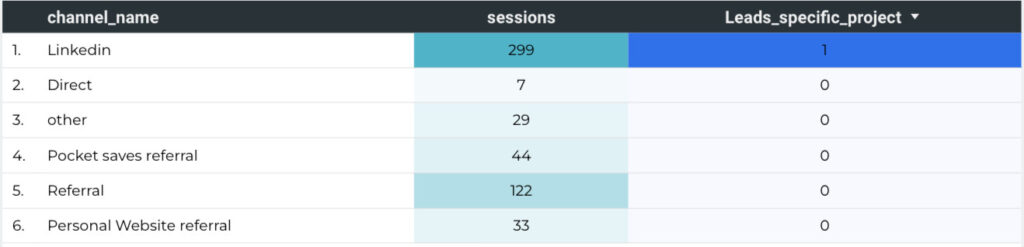
Final result
Section titled “Final result”After saving the view, we can go ahead and link it with looker studio
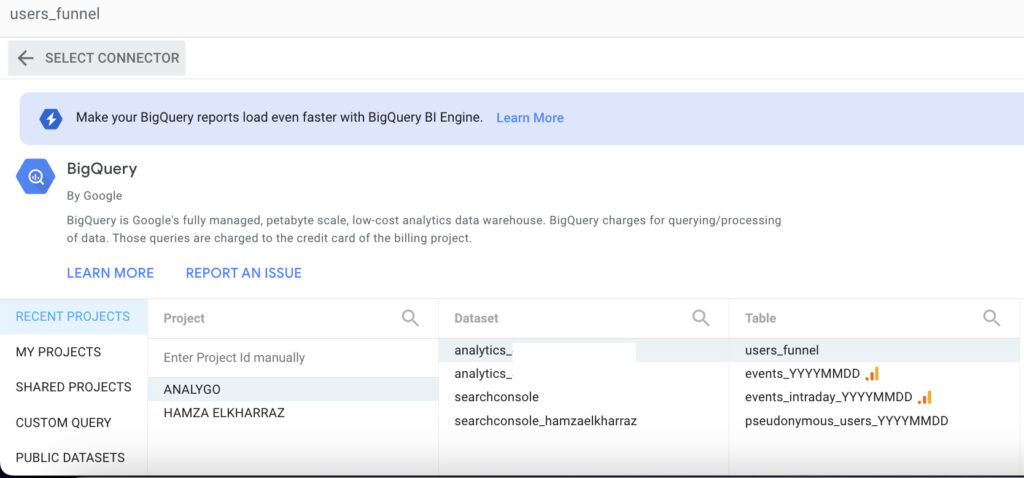
Next, let’s select a data visualization to analyze the data.