Combine Google Search Console with GA4 in BigQuery [2024]
Google Search Console is very useful as it is, but how about taking your analysis to the next level by joining it with GA4 data. There are some requirements for this to work, which we will go through.
Why combine GA4 data with BigQuery?
Section titled “Why combine GA4 data with BigQuery?”Even if you linked Google Search Console to your GA4 property, you won’t see this information in the export. You need to take the Google Search Console data to BigQuery using the bulk export feature.
Query structure
Section titled “Query structure”Our goal is to understand what organic keywords brought users to our website. First, we are going to prepare the data from our GA4 event table. In the second part, we will do the same for Google Search Console. Finally, we will visualize the data using Looker studio.
Preparing GA4 Data
Section titled “Preparing GA4 Data”We will prepare the GA4 fields that we will join later on with Google Search Console:
| Field | Type | Description |
|---|---|---|
| landing_page | string | The name of the landing page. |
| session_id | string | The unique ID of the visit by the user. |
| source | string | The source of visitor (LinkedIn, email…) |
| medium | string | The support used by the user (organic, CPC, email…) |
| date | date | The date when the user triggered an event. |
with ga4_start as(SELECT-- format date PARSE_DATE('%Y%m%d',event_date) as date, -- get unique seesion_id concat(user_pseudo_id,(select value.int_value from unnest(event_params) where key='ga_session_id')) as session_id, -- Get the landing page max(case when (select value.int_value from unnest(event_params) where event_name='page_view' and key='entrances')=1 then (select value.string_value from unnest(event_params) where event_name='page_view' and key='page_location') end) as landing_page, max((select value.string_value from unnest(event_params) where key='medium')) as medium, max((select value.string_value from unnest(event_params) where key='source')) as source, FROM `analygo.analytics_434200232.events_*` -- define dynamic date range where _table_suffix between format_date('%Y%m%d', date_sub(current_date(),interval 1 month)) and format_date('%Y%m%d', date_sub(current_date(),interval 1 day)) group by 1,2 -- Query only data from Google organic having source='google' and medium='organic'),In ga4_start, we selected all traffic from the organic medium and google search engine as the source. We also extracted other fields : date and landing_page which will be used as keys to join with GSC data.
Querying GA4 data
Section titled “Querying GA4 data”After getting all the fields, it’s time to do some calculations and prepare the final GA4 query.
--Aggregate data from ga4_start ga4_data as( select date, landing_page, count(distinct session_id) as unique_sessions from ga4_start group by 1,2),Preparing Google Search Console data
Section titled “Preparing Google Search Console data”Google Search Console export is split into two tables:
1️⃣ searchdata_url_impression: the data is aggregated by the URL (more granular view than 2️⃣).
2️⃣ searchdata_site_impression: GSC data aggregated by the property (no URL data).
We are using the first table because it has the URL data.
First, we need to get the necessary fields from searchdata_url_impression.
The GSC data querying is more straightforward. there are no nested fields. We just need to grab the data directly from the searchdata_url_impression table.
-- Get search console fields gsc_data as (select data_date as date, query, -- New fiel to get the branded/non-brnded querues case when regexp_contains(query,'(analygo)|(hamza)|(kharraz)') then "branded" else 'non-branded' end as branded_query, country, url as landing_page, -- Calculate average postion avg(sum_position) as avg_position, sum(impressions) as impressions, sum(clicks) as clicksfrom `analygo.searchconsole_hamzaelkharraz.searchdata_url_impression`where data_date between date_sub(current_date(),interval 1 month) and date_sub(current_date(),interval 1 day) group by 1,2,3,4,5 having query is not null)We created a new calculated field, branded_query. The query will look for keywords containing any of the terms: ‘analygo’, ‘hamza’, or ‘kharraz’. if there are any matches, it will return the word ‘Branded’.
Notice that we added the having query is not null to avoid getting rows with empty queries.
Joining GSC and GA4 data
Section titled “Joining GSC and GA4 data”The final step is very straightforward. We will take the two previous queries and join them, extracting only the fields we want.
-- Combine GSC with Bigqueryselect  ga4_data.date,  gsc_data.country,  ga4_data.landing_page,  ga4_data.unique_sessions,  gsc_data.query,  gsc_data.branded_query,  gsc_data.impressions,  gsc_data.clicks,  gsc_data.avg_position
from ga4_dataleft join gsc_data on gsc_data.date=ga4_data.dateand ga4_data.landing_page=gsc_data.landing_page;
We used the landing_page and date fields as the join keys for our query.

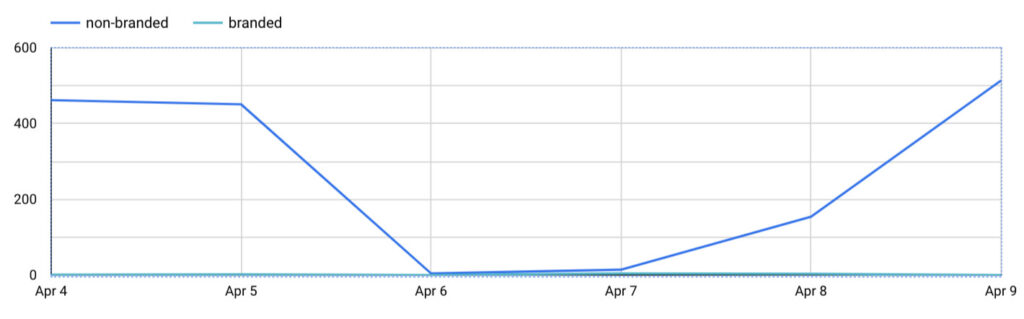
Visualize BigQuery results in Looker Studio
Section titled “Visualize BigQuery results in Looker Studio”Let’s create a scheduled query sot that we can use our in query in Looker studio.
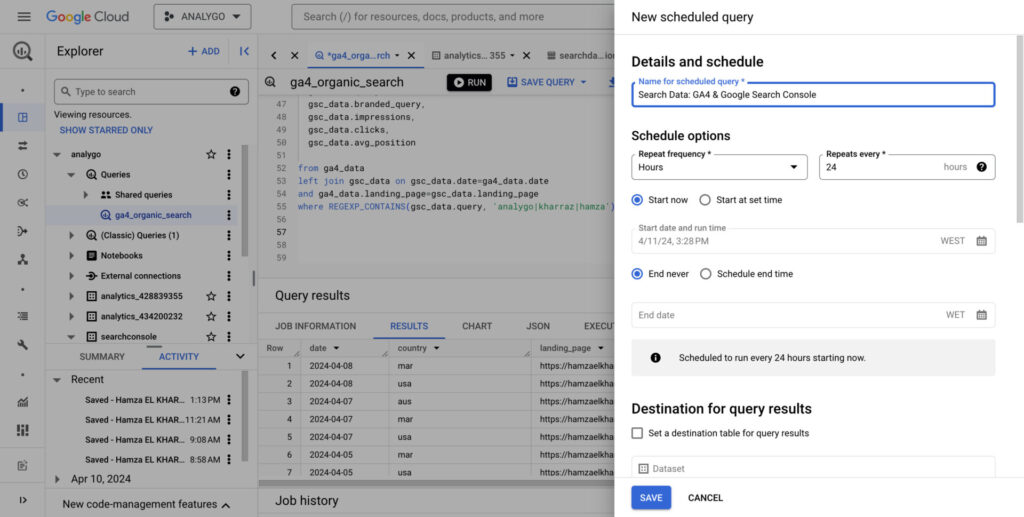
Now we can use the fields within Looker studio to create all kinds of data visualizations.